Free Staff Payroll Spreadsheet — Excel Download for Small Business
Seven connected sheets covering employee records, timesheets, monthly payroll, annual summaries, and a payslip generator. Everything a small business needs — free.
| 👤 By SoloXLS Team | 📅 April 22, 2026 | ⏱ 9 min read |
|
Free Download Staff Payroll Spreadsheet (.xlsx) — 7 Sheets Up to 30 employees · Works in Excel and Google Sheets · No sign-up |
Download Free → |
The moment a small business hires its first employee, payroll becomes a non-negotiable obligation. It has to be right every time, happen on schedule, and account for tax, deductions, and overtime without errors that could attract regulatory attention or damage staff trust.
Dedicated payroll software handles all of this — at a monthly cost that can feel significant for a business running one or two staff. For many small operators, that cost is harder to justify than the time spent on a well-designed spreadsheet.
What’s Inside This Free Payroll Spreadsheet
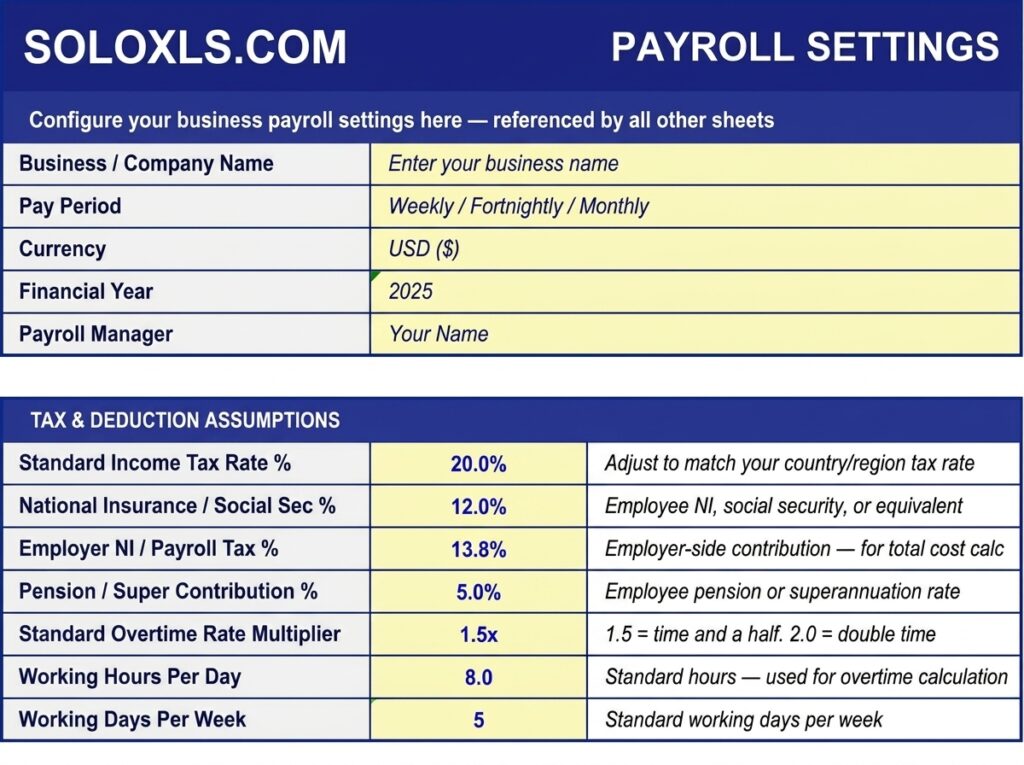
| Payroll Settings | Global tax rates, overtime multiplier, standard hours — set once, apply everywhere |
| Employee Register | 30 employee records — name, job title, pay type, base rate, weekly hours, status |
| Weekly Timesheet | Daily hours entry — total, overtime, and gross pay calculate automatically |
| Monthly Payroll | Gross pay input — tax, NI, pension, net pay, and employer cost all auto-calculated |
| Annual Summary | 12-month payroll log with annual gross, net, and total employer cost totals |
| Payslip Generator | Fill in earnings and deductions — print or save as PDF for each employee |
| How To Use Guide | Step-by-step setup instructions for every sheet |
How to Set Up in 5 Steps
1. Open Payroll Settings and enter your tax rates, pension %, overtime multiplier, and standard hours.
2. Go to Employee Register and add every employee — name, job title, pay type, base rate, weekly hours.
3. Each week, open the Weekly Timesheet, enter the week commencing date, and log daily hours.
4. End of month: open Monthly Payroll, enter gross pay per employee. All deductions and net pay calculate instantly.
5. Copy totals to Annual Summary. Use Payslip Generator to produce a PDF payslip per employee.
⚠ Compliance Note
Tax rates, deduction rules, and payroll legislation vary by country, state, and business type. The rates in this template are examples only. Always verify with a qualified accountant before making payments to employees or tax authorities.
Download the Free Payroll Spreadsheet
7 sheets pre-built. Up to 30 employees. Works in Excel and Google Sheets. Set up in 30 minutes.