Free Income and Expense Tracker Excel — Download for Small Business
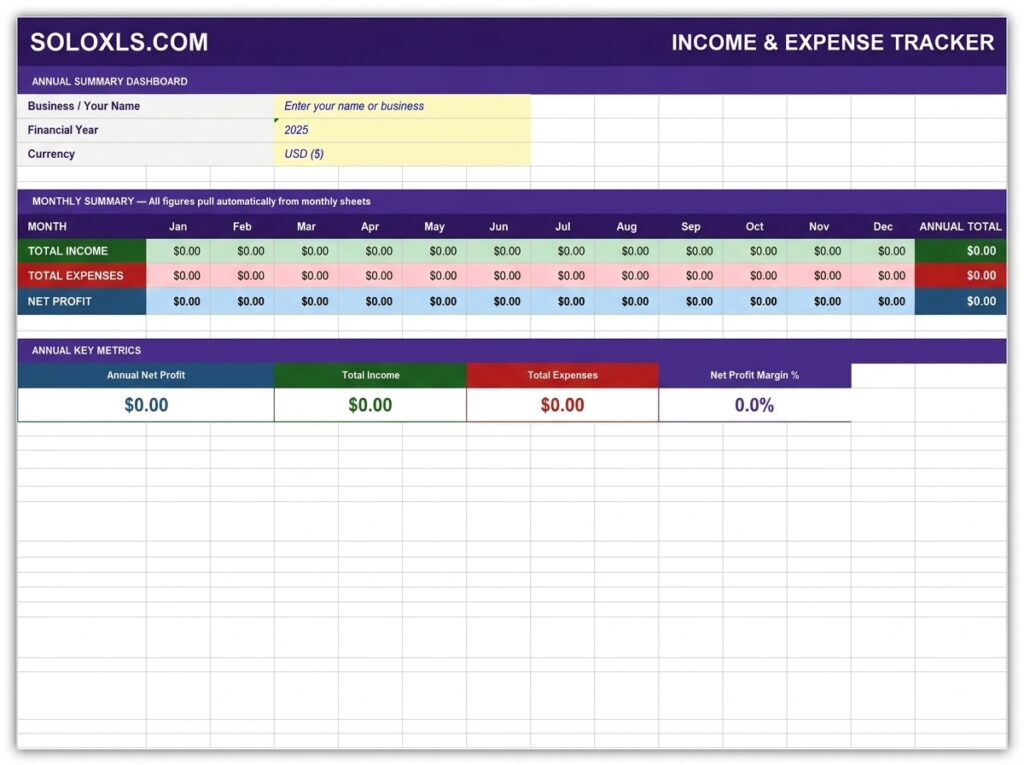
15 sheets — 12 monthly trackers, annual dashboard, and tax summary. Complete financial visibility with no accounting software required.
| 👤 By SoloXLS Team | 📅 April 25, 2026 | ⏱ 8 min read |

|
Free Download Income & Expense Tracker (.xlsx) — 15 Sheets 12 monthly sheets · Annual dashboard · Tax summary · Works in Excel and Google Sheets |
Download Free → |
Every small business owner knows they should be tracking income and expenses. The problem is not intention — it is friction. Accounting software feels like overkill for a one-person operation. A bank statement is not a financial record. And a rough notebook tally is fine until tax time, when rough becomes expensive.
This free income and expense tracker closes that gap. Open it, enter your numbers, and your finances are under control.
What’s Included
| Annual Dashboard | Full-year summary — income, expenses, net profit by month, all auto-updated |
| 12 Monthly Sheets | One per month — 8 income + 15 expense categories, all editable |
| Tax Summary | Quarterly breakdown and annual tax liability estimate |
| How To Use Guide | Step-by-step setup and usage instructions |
How to Set Up in Under 10 Minutes
1. Open the Annual Dashboard. Enter your business name, financial year, and currency in the yellow input cells.
2. Click the January tab. Enter income for each applicable category and leave unused ones blank.
3. Enter each expense amount with date and payment method. Net Profit calculates automatically.
4. Work through each month as the year progresses — the Annual Dashboard updates every time you save.
5. At year end, open Tax Summary, enter your estimated tax rate, and get your liability estimate.
💡 Pro Tip
Set a recurring 15-minute calendar appointment on the first of every month to update the previous month. Consistent monthly entry takes under 10 minutes once the habit is established — and means your annual dashboard is always current.
⚠ Tax Note
The Tax Summary provides an estimate based on the rate you enter manually. Tax calculations vary significantly by country, business structure, and available deductions. Always confirm your liability with a qualified accountant before filing.
Download the Free Income & Expense Tracker
15 sheets pre-built. Add your categories and start entering transactions today. No sign-up required.