Free Client Tracker Spreadsheet for Freelancers — Excel Download
Six connected sheets — contacts, pipeline, follow-ups, projects, and revenue. Everything a solo operator needs to never lose a client through poor follow-through.
| 👤 By SoloXLS Team | 📅 April 25, 2026 | ⏱ 8 min read |

|
Free Download Client Tracker Spreadsheet (.xlsx) — 6 Sheets 40 clients · Pipeline + follow-ups + projects · Works in Excel and Google Sheets |
Download Free → |
Most freelancers lose clients the same way — not through bad work, but through poor follow-through. A lead goes cold because the follow-up slipped. A project stalls because no one tracked the deadline. An invoice goes unpaid for three months because there was no system to flag it.
A client tracker spreadsheet removes the cognitive load of remembering every client, every open deal, and every outstanding payment. When that information lives in a structured system, the relationships take care of themselves.
What’s Inside This Client Tracker
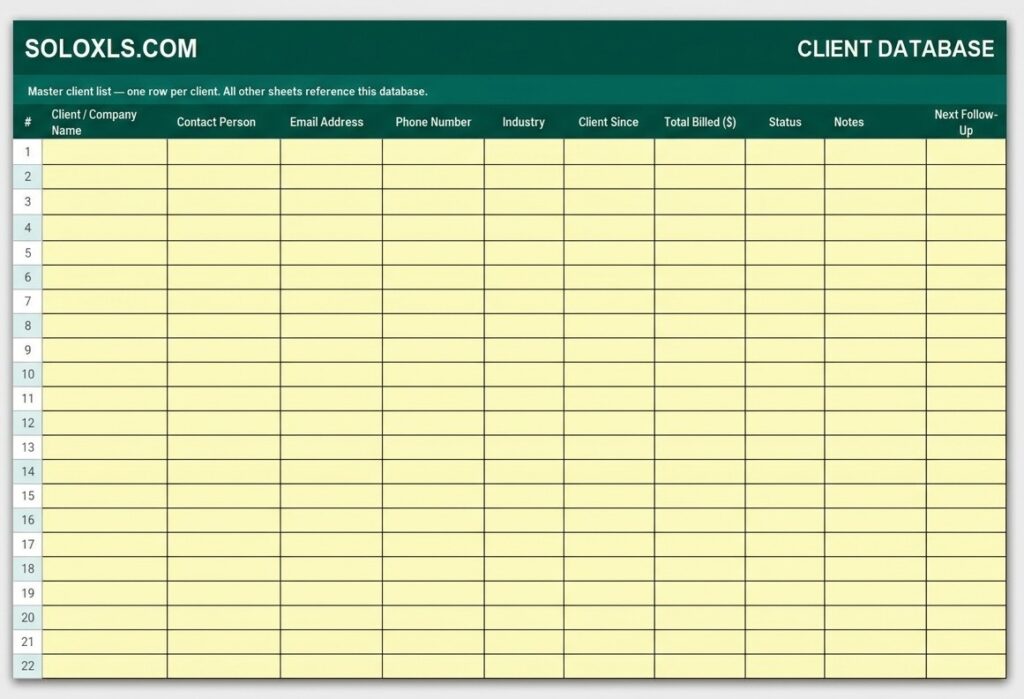
| Client Database | Master list — contact details, status, total billed, next follow-up date |
| Deal Pipeline | Every opportunity from lead to won/lost with deal value and stage |
| Follow-Up Tracker | Log every touchpoint — overdue and due-this-week counts auto-update daily |
| Project Tracker | One row per project — deadlines, status, billed vs received, balance due |
| Revenue Summary | Monthly invoiced and received log with annual totals and outstanding balance |
| How To Use Guide | Step-by-step setup instructions for every sheet |
Excel Tracker vs Paid CRM
| Monthly Cost | ✖ $20–$80 / month (CRM) | ✓ Free forever (this template) |
| Setup Time | ✖ Hours of configuration | ✓ Open and use in 5 minutes |
| Data Privacy | ✖ Cloud — vendor holds data | ✓ Local — your machine only |
| Works Offline | ✖ Requires internet | ✓ 100% offline capable |
How to Set Up in 4 Steps
1. Open the Client Database and add your existing clients — one row each with name, contact details, status, and next follow-up date.
2. Go to the Deal Pipeline and add every active opportunity you’re currently working with its real current stage.
3. In the Follow-Up Tracker, log the last time you contacted each client and set a next follow-up date.
4. Add active projects to the Project Tracker with deadlines and billing status. Review balance due — anything overdue needs action today.
💡 Pro Tip
Open the Follow-Up Tracker every Monday morning. Sort by the Next Follow-Up column to see everything overdue and due this week in one view. Clear the week’s follow-ups before taking on new work.
Download the Free Client Tracker
All 6 sheets pre-built. Populate your client list and start your first week with complete pipeline visibility.