Food Cost Template for Small Restaurant — Free Excel Download
Four connected sheets — ingredient database, recipe cost calculator, and menu profitability tracker. Know your food cost percentage before the lunch service ends.
| 👤 By SoloXLS Team | 📅 April 25, 2026 | ⏱ 8 min read |

|
Free Download Food Cost Calculator Template (.xlsx) — 4 Sheets 50 ingredients · Recipe costing · Menu profitability tracker · Works in Excel and Google Sheets |
Download Free → |
Food cost is the number that quietly determines whether a restaurant survives or closes. Most small restaurant owners know this in theory. Very few track it consistently — not because they don’t care, but because the tools available are either too expensive, too complex, or not built for a small operation.
This free food cost template fixes that. Open it, enter your ingredients and recipes, and you’ll know your food cost percentage before the lunch service ends.
What’s Inside This Template
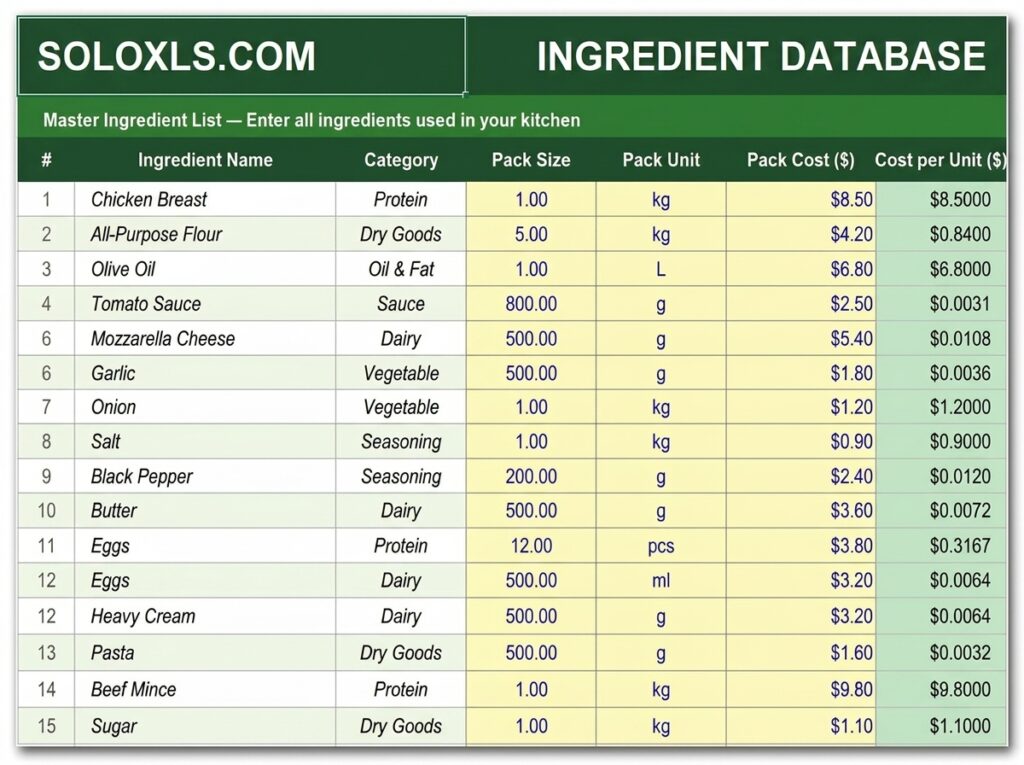
| Ingredient Database | 50 ingredients — name, pack size, unit, pack cost, cost per unit auto-calculated |
| Recipe Cost Calculator | Line-by-line recipe costing — total cost, cost per portion, gross profit, food cost % |
| Menu Profitability Tracker | Every menu item on one sheet with traffic-light status — see which dishes are profitable at a glance |
| How To Use Guide | Step-by-step instructions for every sheet |
Food Cost % — How to Read Your Number
| Under 28% | Excellent — fine dining or high-efficiency kitchen |
| 28–35% | Good — healthy margin for most restaurants |
| 35–40% | Review — pricing or portion sizes need attention |
| Over 40% | Critical — losing money, act immediately |
How to Set Up in Under 10 Minutes
1. Open the Ingredient Database and enter your top 20 most-used ingredients — pack size, unit, and what you pay per pack. Cost per unit calculates automatically.
2. Go to Recipe Cost Calculator. Enter recipe name, portions it produces, and intended selling price.
3. Add each ingredient used, quantity per batch, and unit cost from your Ingredient Database.
4. Set your labour and overhead percentage — 15% is a reasonable starting point for most small operations.
5. Read your results: total recipe cost, cost per portion, gross profit, and food cost % — all calculated automatically.
6. Repeat for every recipe, then populate the Menu Profitability sheet to see your full menu picture in one view.
💡 Pro Tip
Run this process at the start of every month and whenever a major supplier raises prices. Even a 10% increase in chicken or cooking oil can push a dish from profitable to loss-making without the menu price moving at all.
Download the Free Food Cost Template
Ingredient database, recipe costing, and menu profitability tracker — all pre-built. Free, no sign-up.